



Updated on: May 20, 2026
Reading Time: 4 minutes
TL;DR: Google Maps allows you to share your real-time location by accessing your profile, selecting location sharing, choosing duration, and sending the link to contacts. Live location sharing has become essential for businesses, with over 1 billion monthly users relying on real-time tracking features. Route optimization tools like Zeo Route Planner enhance this with automated customer notifications and branded tracking pages, helping delivery teams save 2+ hours daily.
Over a billion people worldwide use Google Maps as their go-to navigation app (every month). There are features like turn-by-turn directions, real-time traffic updates, and millions of business listings.
One of its standout features is Share Location, which can broadcast a real-time position to friends, family, or customers for as long as you want. This is perfect for meeting up, tracking deliveries, or coordinating teams. Unlike sharing a simple map or address, this live location shares updates as you move, giving others peace of mind and clear info.
From a business perspective, similar to Google Maps API, Zeo Route Planner utilizes live tracking to enhance customer trust and delivery transparency in real-time.
Step-by-Step: Share Your Live Location in Google Maps
It is simple to share your live location on Google Maps, especially for meeting up, tracking deliveries, or keeping others informed in real time.
A series of steps is to be performed to share your live location in Google Maps. Also, you’ll have to choose the right contacts to provide them with accurate, live tracking.
It helps reduce back-and-forth calls and improve overall communication.
- Open Google Maps on your phone and make sure you’re signed in.
- Tap on your profile icon (top right corner).
- Select Location sharing from the menu.
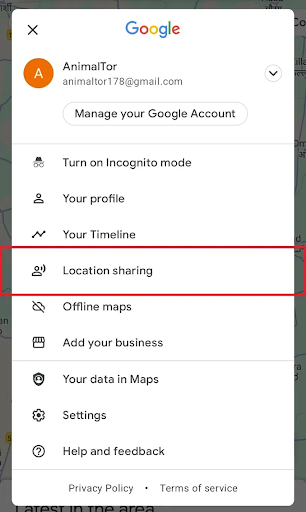
Google Maps Location Sharing
- Tap New share or Share location.
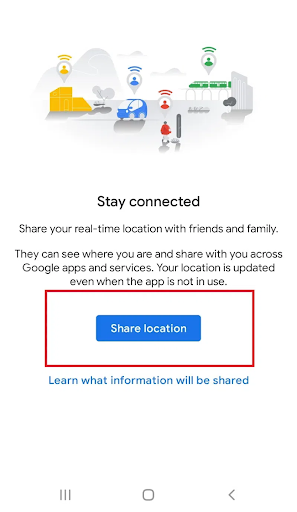
Share location
- Choose the duration. For example, sharing a location (e.g., 15 minutes, 1 hour, or until you turn it off).
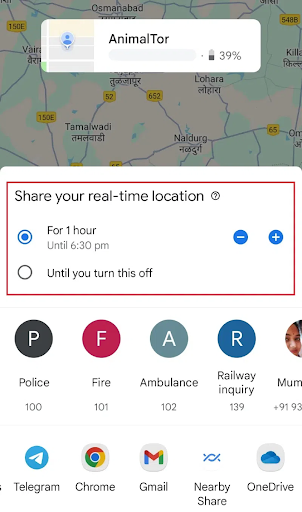
Location Duration
- Choose the contacts with whom you want to share your location.
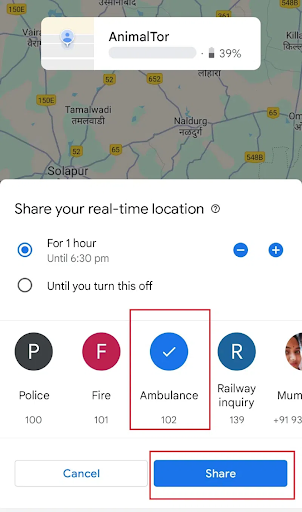
Choose Contacts
- Tap Share or Send.
This will share a notification to your contacts or a link to view your live location.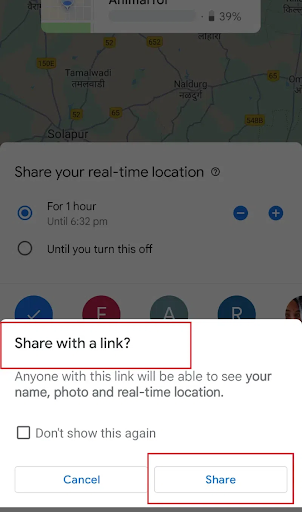
Share Link
What are Shareable Maps in Google Maps
Shareable Maps in Google Maps (via Google My Maps) let you create custom maps with multiple pins, routes, and labels that can be shared as a static link.
When you use this, the recipient gets a fixed snapshot, such as a pin on a place, a route, or a business location.
Some of the common use cases include trip planning, event coordination, or sharing area-based information ahead of time. Everyone with the link sees the same saved locations and notes, but not your real-time movement.
Live Location sharing, on the other hand, broadcasts your real-time position as you move. Recipients see your update on the map continuously for the time you choose.
Here’s how live location differs from shareable maps options
| Feature | Share Location (Live) | Shareable Maps/Location (Static) |
| Updates as you move | Yes | No |
| Duration | You choose (mins/hours/off) | Indefinite, no updates |
| Recipient sees | Your real-time position, name, profile, and device battery | Just the map/location/route shared (snapshot) |
| Typical Use | Meetups, road trips, deliveries, safety tracking | Sending an address, planned route, place, or event |
Why Real-Time Tracking Matters for Business Operations
Real-time location tracking has evolved from a convenience feature to a business necessity in 2026. Studies show that 93% of customers expect real-time delivery updates, making live tracking a competitive differentiator across industries.
For field service teams, delivery operations, and mobile workforces, live location sharing improves operational efficiency by reducing coordination calls, improving customer satisfaction, and enabling better resource allocation. Emergency services, telecom dispatch teams, and logistics companies rely on this technology to maintain visibility into their distributed operations.
Advanced Location Sharing for Professional Teams
While Google Maps serves individual users well, professional operations often require more sophisticated tracking capabilities. Business teams need features like automated customer notifications, multi-stop route visibility, and integration with scheduling systems.
Optimize routes with our algorithm, reducing travel time and costs efficiently.
increase fuel savings
Hassle Free Deliveries & Pickups!

Professional route planning applications address these needs by combining live tracking with operational tools. These platforms enable dispatchers to monitor entire fleets, automatically update customers about delays, and maintain detailed records for service verification.
The integration of live tracking with route optimization creates powerful operational advantages, particularly for businesses managing complex delivery schedules or field service appointments with specific time windows.
How Zeo Route Planner Supports Live Location Sharing
Just like Google Maps, Zeo Route Planner lets businesses and delivery teams share drivers’ live locations with customers. It’s a Google Maps alternative with extra features designed specifically for logistics.
It includes
- Real-time route broadcasting: Dispatchers can share a driver’s live route with all customers on that delivery, boosting transparency and cutting down “Where’s my order?” calls.
- Automatic live links: Zeo sends customers a link to track deliveries right from their phones, regardless of whether they have Zeo or Google Maps installed.
- More than location sharing: Zeo offers route optimization with live tracking, vehicle assignment, proof-of-delivery snapshots, and other tools. It is built to scale multi-stop deliveries and improve customer satisfaction.
Zeo Route Planner to Share Live Location of Drivers
Zeo Route Planner optimizes routes and also provides real-time live location sharing to enhance delivery transparency.
There’s an automated live location sharing link you can generate using Zeo Route Planner and send it to customers..
These are the steps:
- Log in to your Zeo Route Planner dashboard and find the list of your delivery routes.
- Locate the specific route for which you want to share the driver’s live location.
- Click on the three dots (options menu) next to that route to open more actions.
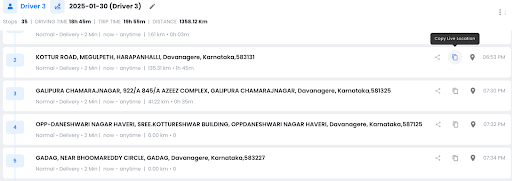
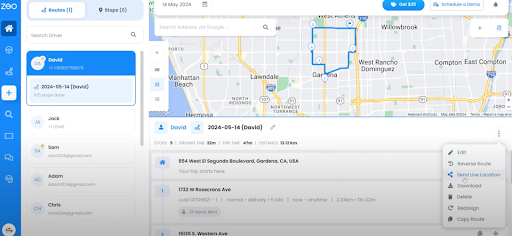
- From the menu, select “Send Live Location”.
- Alternatively, you can click on the copy icon to generate a live location link that you can share with all customers associated with that route.
- Share this link with customers.
Frequently Asked Questions
Can I share my Google Maps location without the other person having the app installed?
Yes, when you share your live location through Google Maps, it generates a web link that works in any browser. Recipients don’t need the Google Maps app installed to view your real-time location updates.
How long can I share my live location on Google Maps?
Google Maps allows you to share your live location for preset durations ranging from 15 minutes to 3 days, or you can choose to share until you manually turn it off. The sharing automatically stops when your chosen time expires.
What information do people see when I share my live location?
When you share live location, recipients see your real-time position on the map, your name, profile picture, and device battery level. They can also see your movement speed and direction as you travel.
Can I share live location for multiple drivers at once for business deliveries?
Google Maps doesn’t support bulk location sharing for business operations. Professional route optimization platforms like Zeo Route Planner address this with automated customer notifications and branded tracking pages, serving 1.5M+ users across 150+ countries.
Does sharing live location drain my phone battery faster?
Yes, sharing live location does increase battery consumption because your phone continuously updates your GPS position and transmits data. Google recommends keeping your device charged during extended location sharing sessions.
Conclusion
Live location sharing has become a necessary tool for businesses and customers alike. It helps everyone, from dispatchers to customers and drivers, to remain connected for smoother deliveries and a better experience.
If you’re into logistics or the delivery business, Zeo Route Planner can help you operate your business efficiently and delight customers at every step.
Want to see how you can put live location sharing at the heart of your operations with Zeo?

Are you a fleet owner?
Want to manage your drivers and deliveries easily?
Grow your business effortlessly with Zeo Routes Planner – optimize routes and manage multiple drivers with ease.
increase fuel savings
Hassle Free Deliveries & Pickups!
Optimize routes with our algorithm, reducing travel time and costs efficiently.
Get Started for Free



















