


Updated on: June 1, 2026
Reading Time: 6 minutes
TL;DR: Improving delivery services requires optimizing routes, implementing real-time tracking, and enhancing customer communication to reduce costs and boost satisfaction. Studies show that companies using route optimization can reduce delivery costs by up to 20% while improving on-time performance. Route optimization tools like Zeo Route Planner address this with AI-powered route optimization and real-time GPS tracking, helping delivery teams save 2+ hours daily.
Delivery operations are crucial in today’s rapidly evolving landscape of modern business. Ensuring cost-effectiveness and customer satisfaction heavily depends on the efficiency of your delivery processes.
An efficient delivery service will help you build trust, earn customers’ loyalty, enhance brand awareness, gain sales, and attract new customers. In this blog, let’s explore actionable tips that can be implemented to improve your delivery services.
The Challenges Faced by Delivery Services
Delivery services need help with efficiently delivering packages. Here are some of the common challenges faced by delivery service businesses.
- Operational Issues: Efficiently moving delivery packages from the initial place to the final destination is crucial. Finding the most efficient routes to avoid package delivery service delays involves leveraging advanced route optimization software.
- Last-mile delivery challenges: Last-mile delivery is expensive for both consumers and delivery service companies. Different things such as fuel costs, vehicle maintenance, labor costs, and operational costs affect cost-efficient and profitable delivery. According to the U.S. Department of Transportation, last-mile delivery accounts for up to 53% of total shipping costs.
- Lack of visibility status of locations and transparency: Not knowing where your fleet is can create several problems that can impact the efficiency of your deliveries. This makes it difficult to communicate with the fleet management team. Communicate return and exchange policies to customers, and ensure the customers know the timelines for returning items.
- Inventory management issues: Manual picking and shipping processes can slow down order performance which can lead to delayed delivery. It can also increase the operational costs due to the need for returns and reshipments.
Read More: Best Delivery And Pickup Services To Start
Understanding the Financial Impact of Delivery Inefficiencies
The cost of poor delivery service extends far beyond operational expenses. Research from the Bureau of Labor Statistics shows that inefficient delivery operations can increase labor costs by up to 30%, while customer acquisition costs rise significantly due to poor retention rates.
Failed deliveries alone cost businesses an average of $17.78 per failed attempt, including redelivery expenses, customer service calls, and potential refunds. When multiplied across thousands of deliveries annually, these costs can severely impact profit margins and competitive positioning in 2026’s demanding market.
Top Best Practical Ways To Improve Delivery Service
If you’re just starting or trying to manage your delivery service growth, these practical ways will help you improve your delivery processes, your customer satisfaction, and your profitability.
#1. Route Planning
Route planning is the process of calculating the effective method of transportation and determining the most optimal route for your delivery drivers. It is used to discover the most cost-effective route when moving from one place to another.
By leveraging the right route planing software or algorithms you can maximize the efficiency of your delivery routes. This software can solve crucial factors such as distance and delivery time windows. Ultimately results in reduced travel time and minimized fuel costs.
#2. Utilize Real-Time Order Tracking
Real-time tracking technologies like GPS allow you to track your drivers in real-time. It provides real-time visibility of shipments to both customers and internal stakeholders, which can improve communication, reduce inquiries, and enable proactive issue resolution. Thus there will be visibility for customers through a link so they can see where the driver is and know how far away they are from arriving.
#3. Leverage Automation
Embrace automation, particularly in manual processes like order processing, invoicing, and inventory management. By automation, you can effectively streamline operations, reduce errors, and enhance overall efficiency. Automating these processes helps eliminate human error and improve the allocation of delivery resources.
#4. Enhance Communication
Streamlined communication among all stakeholders engaged in the delivery process, including suppliers, carriers, and customers is a great way to improve delivery speed. This fosters enhances overall effectiveness and clear and timely communication helps resolve issues quickly and avoid misunderstandings.
For More: What Features Does Delivery Software Offer For Managing Deliveries
Implementing Performance Metrics and KPIs
Establishing clear performance indicators is essential for measuring delivery service improvements. Key metrics include on-time delivery percentage, average delivery time, cost per delivery, customer satisfaction scores, and driver efficiency ratings.
Successful delivery operations in 2026 typically maintain on-time delivery rates above 95%, keep customer complaint rates below 2%, and achieve delivery cost optimization of at least 15% annually. Regular monitoring of these metrics enables data-driven decision making and continuous operational improvements.
How Can Features of Zeo Route Planner Help in Improving Delivery Services?
All delivery service business needs a route planner that is easy to use and has helpful features. Zeo Route Planner is specially designed to optimize routes for delivery services. It offers several features that can significantly improve the efficiency and effectiveness of your delivery operations.
Now let’s dive into some features of Zeo that can help your delivery service.
Optimize routes with our algorithm, reducing travel time and costs efficiently.
increase fuel savings
Save $200 on fuel, Monthly!

#1. Route Optimization
Efficient route optimization is crucial for delivery service businesses to minimize delivery operational costs and delivery time. Zeo has advanced algorithm features to calculate the most efficient delivery routes. By considering factors like vehicle capacities, and delivery windows, Zeo Route Planner always ensures that businesses can improve their delivery efficiency.
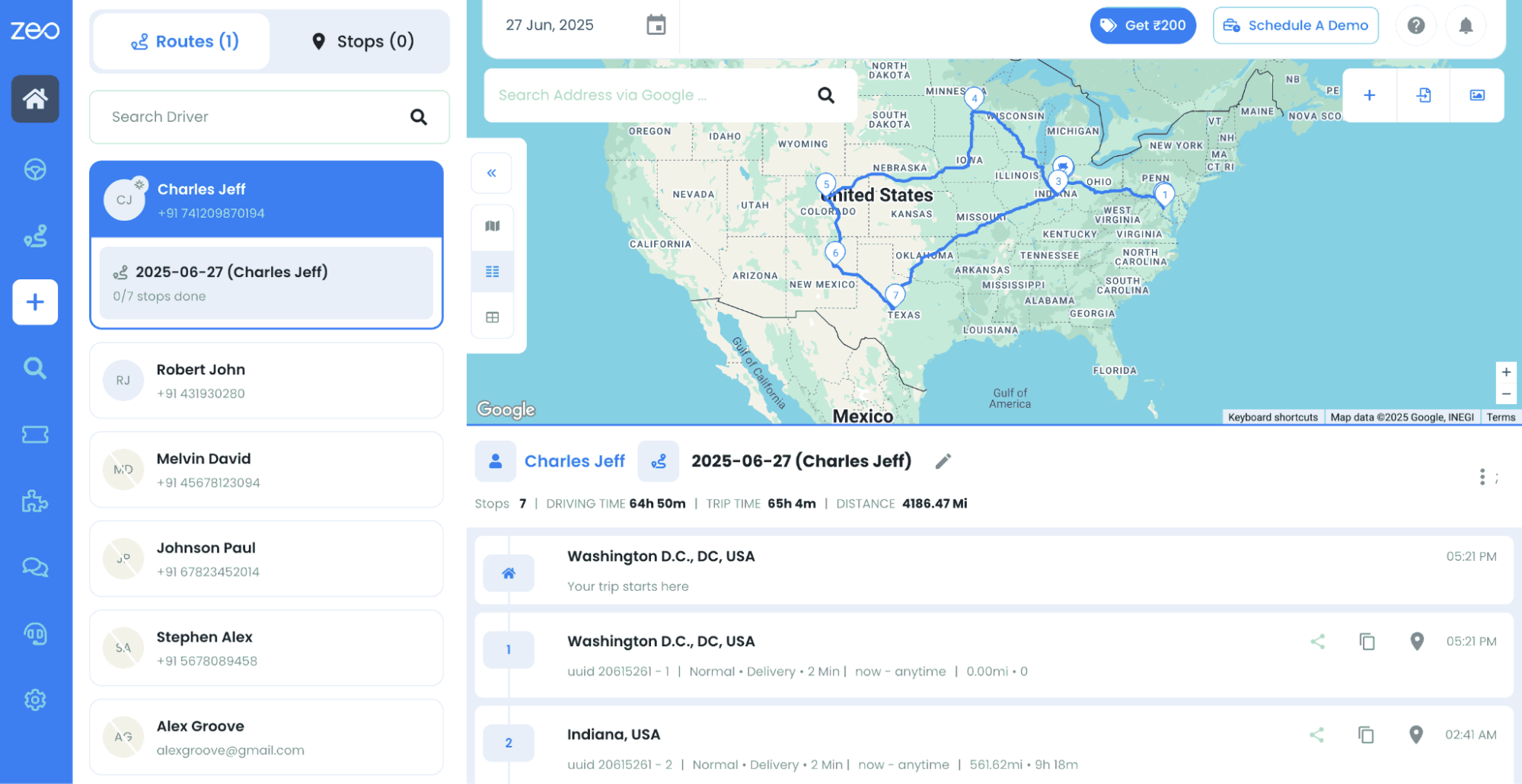
#2. Real-Time Tracking & ETAs
Real-time tracking is essential For providing customers with visibility into their order status real-time tracking is very important. It also ensures transparency throughout the delivery process. Zeo’s real-time tracking capabilities enable customers to track their product updates from dispatch to delivery. By providing accurate ETA notifications, Zeo enhances transparency and trust, resulting in higher customer satisfaction and loyalty.
#3. Dynamic Route Adjustment
The ability to adapt the changing conditions is crucial for delivery service businesses. Zeo’s dynamic route planning feature allows businesses to respond quickly Zeo Route planner ensures that deliveries are made promptly and efficiently, even in unpredictable circumstances.
#4. Customizable Communication
Customized messaging is another feature of Zeo that assists delivery teams’ updates which is essential for maintaining clear communication with customers. The customizable messaging features, of Zeo, can maintain clear and consistent communication with customers, ultimately ensuring a positive experience throughout the delivery process.
#5. Analytics and Reporting
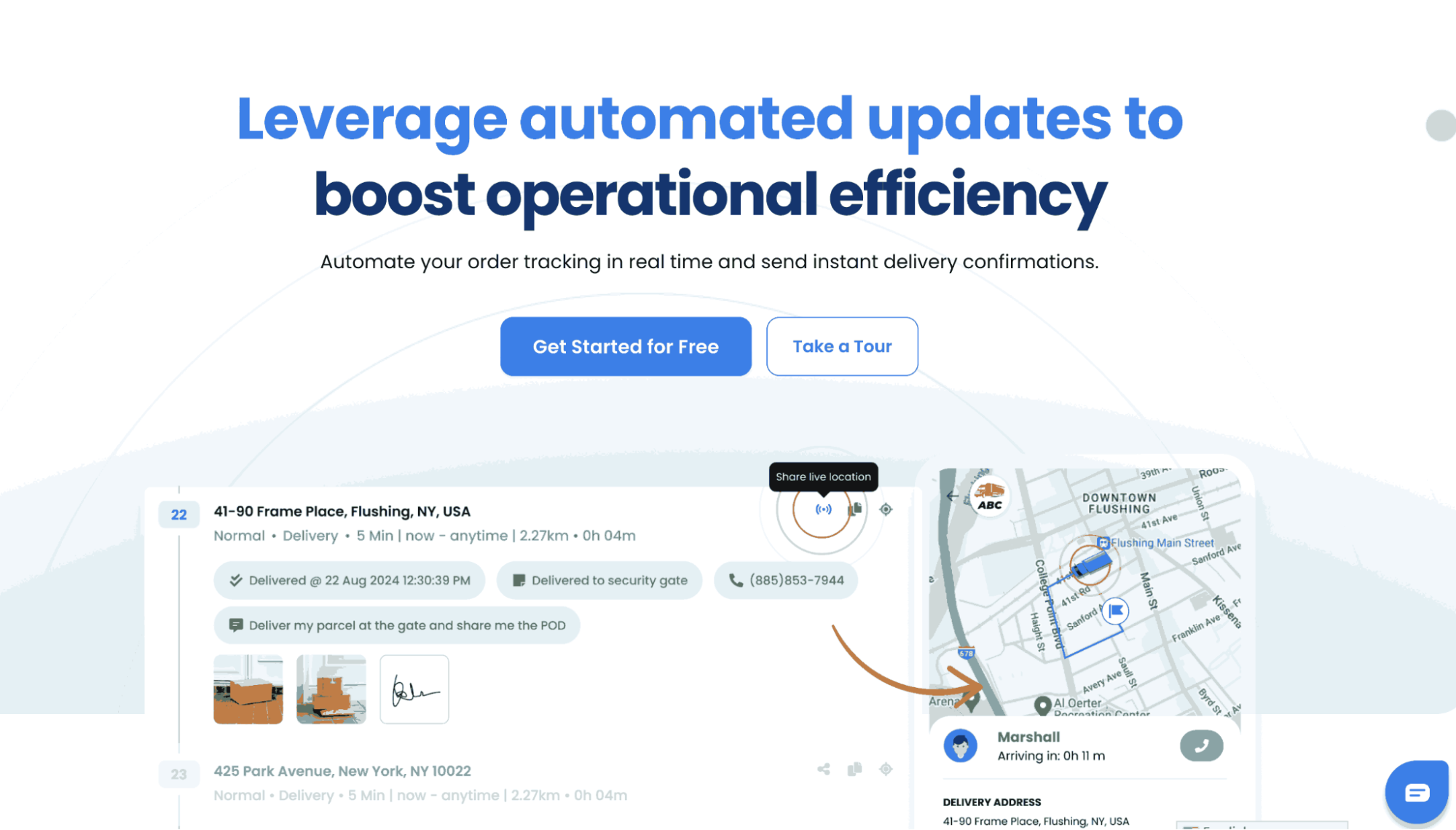
Data-driven decision-making is critical for driving continuous growth and success in delivery services. Zeo’s analytics and reporting features provide valuable insights into delivery performance metrics, such as delivery times, and customer feedback completion rates. By analyzing these metrics, delivery businesses can identify areas for improvement and ultimately enhance their competitiveness in the market.
Read More: Features To Look At In A Delivery Management App In 2026
Frequently Asked Questions
How much can route optimization reduce delivery costs?
Route optimization typically reduces delivery costs by 15-25% through decreased fuel consumption, reduced vehicle wear, and improved driver productivity. Companies also see up to 30% reduction in delivery time and significantly lower overtime expenses.
What’s the most effective way to handle failed deliveries?
Implement real-time communication with customers before attempting delivery, offer flexible delivery windows, and provide secure drop-off locations. Proactive customer notifications about delivery status reduce failed delivery rates by up to 40%.
How does real-time tracking improve customer satisfaction?
Real-time tracking increases customer satisfaction by providing transparency and control over the delivery experience. Studies show that customers who receive live tracking updates are 73% more likely to recommend the service and have 35% fewer inquiries to customer support.
What technology features are essential for modern delivery operations?
Essential features include AI-powered route optimization, real-time GPS tracking, automated customer notifications, and proof of delivery capabilities. Advanced solutions like Zeo Route Planner combine these with capacity-based routing and driver performance analytics, helping teams save 2+ hours daily while serving over 1.5M+ users globally.
How can small delivery businesses compete with large carriers?
Small businesses can compete by focusing on personalized service, local market knowledge, and flexible delivery options that large carriers can’t match. Leveraging cost-effective route optimization technology levels the playing field by providing enterprise-level efficiency at accessible pricing.
Final Thought
Delivery Service business faces endless challenges in managing their delivery operations. However, you can overcome these obstacles and thrive in the competitive world, with the right tools and strategies in place.
As you embark on your delivery services and pickup business journey, consider leveraging tools like Zeo route planning software with mindblowing features that can help you streamline operations, enhance customer satisfaction, and maximize profitability. Zeo Route Planner offers a fleet management tool to manage your delivery vehicles and drivers effortlessly.
To know more about Zeo, book a free demo today!

Are you a fleet owner?
Want to manage your drivers and deliveries easily?
Grow your business effortlessly with Zeo Routes Planner – optimize routes and manage multiple drivers with ease.

increase fuel savings
Save 2 Hours on Deliveries, Everyday!
Optimize routes with our algorithm, reducing travel time and costs efficiently.
Get Started for Free



















