


Updated on: September 1, 2026
Reading Time: 5 minutes
TL;DR: Altering settings in Zeo Route Planner is a quick process handled entirely from the “My Profile” and “App Settings” menus, letting you customize theme, time format, and distance units in under a minute. Small preference changes like these reduce daily friction for dispatchers and drivers reading schedules and mileage logs. Route optimization tools like Zeo Route Planner address this with flexible app settings and miles tracking for expense records, helping delivery teams save 2+ hours daily.
Zeo is designed for seamless delivery operations. The Zeo app allows businesses to tailor settings based on their unique requirements. It’s important to know how to adjust the app’s settings. In this blog post, let us go through the steps on how to alter settings in Zeo Route Planner for a smooth and efficient delivery.
Why Customizing Your Route Planner Settings Matters
Dispatchers, drivers, and fleet managers all interact with route planning software differently throughout the day. A driver working an early morning shift may prefer a dark theme to reduce eye strain on their phone screen, while a dispatcher reviewing schedules in a bright warehouse office may want the standard light theme. Similarly, teams operating internationally or working with clients who expect a specific time notation often need to switch between 12-hour and 24-hour formats to avoid scheduling confusion.
These may seem like small adjustments, but they add up. According to the U.S. Bureau of Labor Statistics, delivery and driver-sales workers frequently juggle multiple digital tools during a shift, and interface friction — hard-to-read screens, mismatched units, confusing time stamps — can slow down route completion. Getting your app settings right the first time means less back-and-forth and more time spent actually driving the route. If you’re still deciding which platform fits your operation best, our Route Planner Guide: Choose the Right Solution in 2026 breaks down what to look for beyond basic customization options.
Changing the Theme
You can also change the theme of your Zeo Route Planner.
Follow the steps to change the theme of your app:
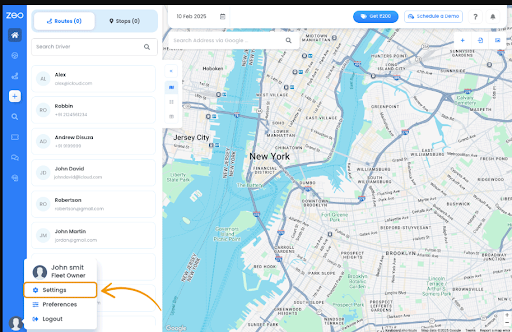
- Open the Zeo Route Planner and navigate to the “My Profile” section.
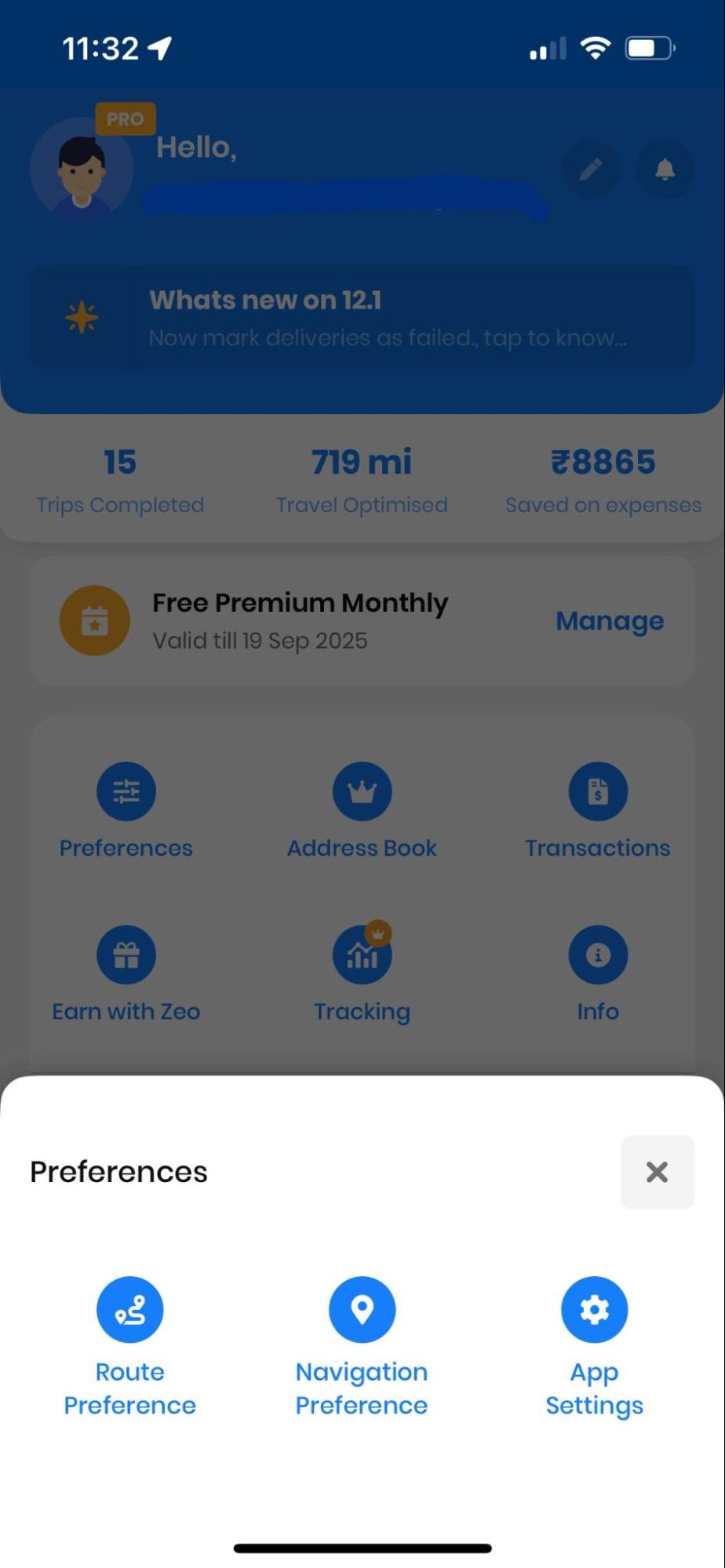
- From the preferences section, click on, the “App Settings” tab. You will be displayed a list of preferences. Scroll down, and you will find the “Theme” section.
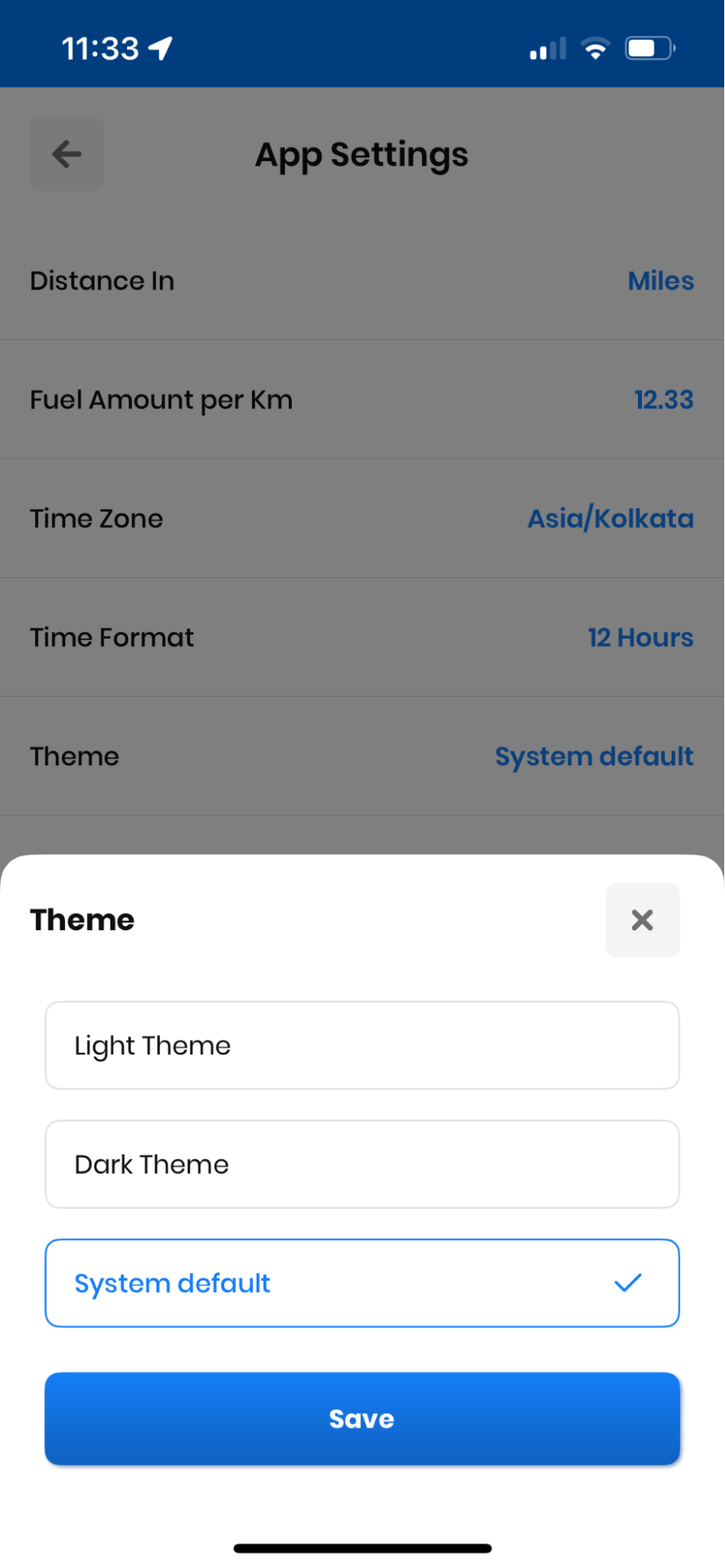
- Tap on the “Theme” and select the desired theme among “Light Theme” or “Dark Theme.”
- Click on the “Save” button, and your changes will be displayed.
Changing Time Format
You can change the time format in the Zeo Route Planner app according to your need.
Follow these steps to change the time format:
- Open the Zeo Route Planner and navigate to the “My Profile “ section.
- From the “Preference” section click on, the “App Settings” tab.
- You will be displayed a list of preferences. Scroll down, and you will find the “Time Format” section.
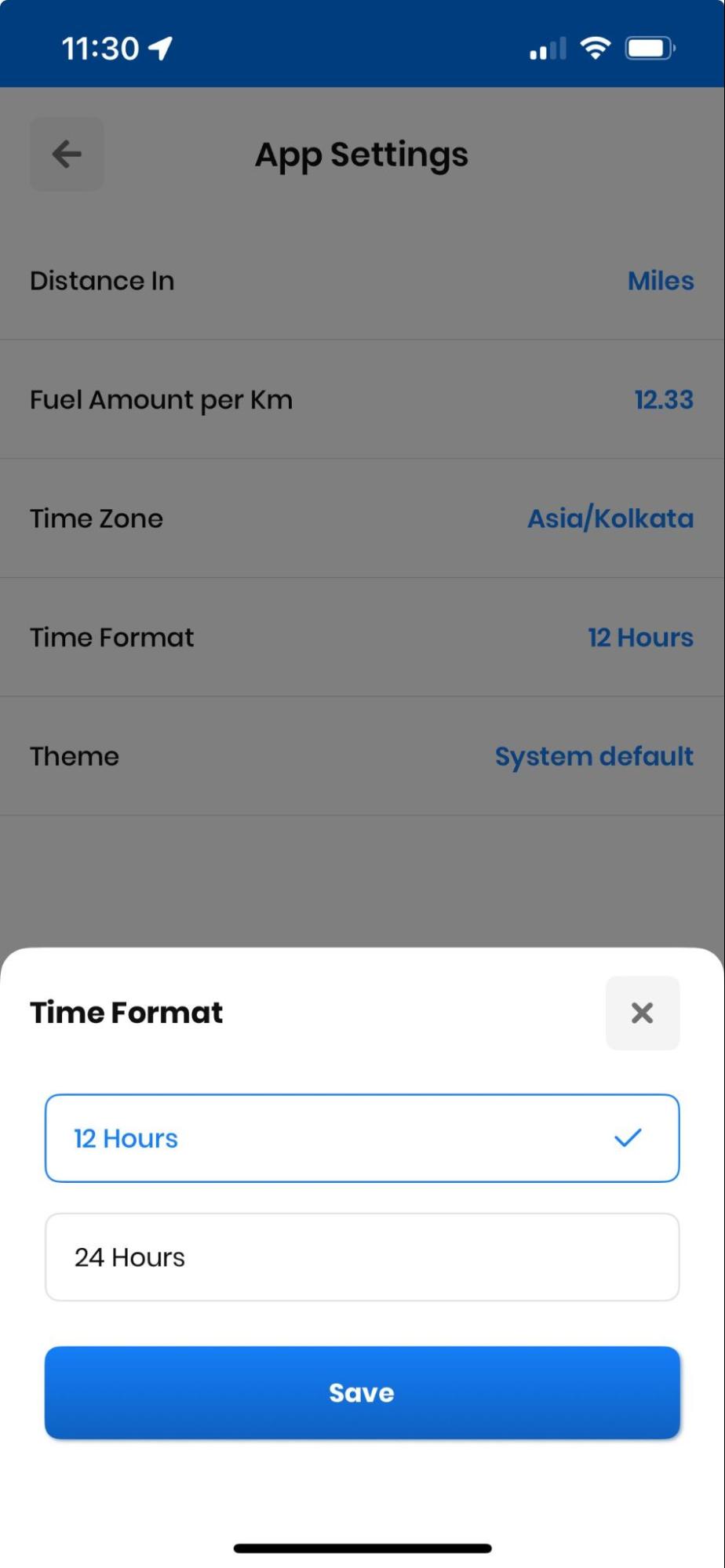
- Tap on the “Time Format” and select the desired time format, i.e., “12 Hours” or “24 Hours”.
- Click on the “Save” button, and your changes will be displayed.
Changing the Distance Unit
Zeo Route Planner allows you to changes the distance metric according to your preferred choice.
Optimize routes with our algorithm, reducing travel time and costs efficiently.
increase fuel savings
Hassle Free Deliveries & Pickups!

To change the distance unit follow the process as below:
- Open the Zeo Route Planner and navigate to the “My Profile” section.
- From the My Profile section click on, the “Preference” tab. You will be displayed some preferences, click on “App Settings”.
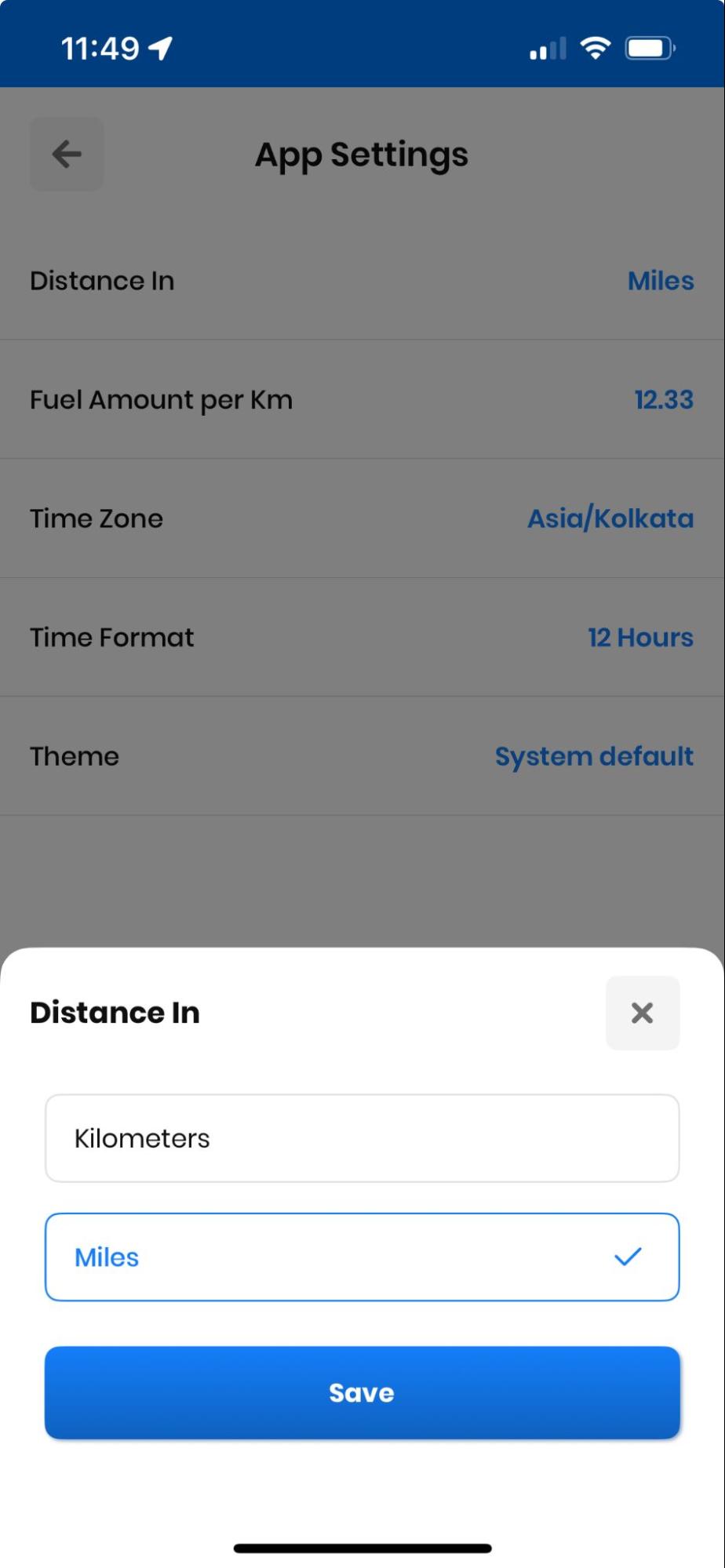
- From the list, select the “Distance in” tab, choose your desired unit and click on the “Save” button. You will see the changes in the navigation section.
Other Settings Worth Reviewing for a Smoother Workflow
Beyond theme, time format, and distance units, it’s worth periodically checking a few other areas of your route planning app to make sure they still match how your team operates. Driver profiles, work hours, and break time settings should be reviewed whenever staffing changes, since outdated driver information can lead to mismatched schedules or inaccurate route assignments. If your business relies on recurring stops, revisiting your list of favorites and any scheduled or recurring routes ensures dispatchers aren’t manually re-entering the same addresses week after week.
It’s also worth checking how your business tracks vehicle mileage. Accurate mileage logs matter for both tax reporting and reimbursement, and the IRS standard mileage rate guidance makes clear how much documentation can affect deductions. Zeo’s miles tracking feature keeps a running record for expense and tax purposes, which pairs well with the app-level settings covered above. For teams comparing mileage tools across different platforms, our Best Mileage Tracking Apps for Delivery Drivers: 2026 Testing Results post walks through what separates a reliable tracker from a basic odometer app.
Finally, if you’re managing a growing fleet, take a look at your integrations settings. Connecting tools like Shopify, WooCommerce, or Zapier can eliminate manual data entry between your storefront and your route planner, which becomes more valuable as order volume increases. Our Best Route Planner App 2026: Complete Business Guide covers how these connections fit into a broader delivery workflow if you’re evaluating your full tech stack this year.
Still Need Help?
Contact us by writing to our team at support@zeoauto.com, and our team will reach out to you. To ensure your route matches your delivery instructions, Zeo Route Planner offers several options that you can set up.
Frequently Asked Questions
How often should delivery teams review their route planning app settings?
Most businesses only need to review app settings when staffing, schedules, or operating regions change — there’s no need to check them daily. A good rule of thumb is to revisit preferences like time format and units whenever you onboard new drivers or expand into a new region with different measurement standards.
What’s the difference between light and dark theme for delivery drivers?
Light theme works best in bright environments like daytime driving or well-lit warehouses, while dark theme reduces glare and eye strain during early morning or nighttime shifts. Many drivers switch themes seasonally as daylight hours change, particularly in regions with shorter winter days.
Why do delivery apps offer both 12-hour and 24-hour time formats?
Time format preferences vary by region and indust

Are you a fleet owner?
Want to manage your drivers and deliveries easily?
Grow your business effortlessly with Zeo Routes Planner – optimize routes and manage multiple drivers with ease.
increase fuel savings
Hassle Free Deliveries & Pickups!
Optimize routes with our algorithm, reducing travel time and costs efficiently.
Get Started for Free



















