



Updated on: September 14, 2026
Reading Time: 5 minutes
TL;DR: The fastest way to boost efficiency in your delivery process is to use a routing app that automates stop sequencing, live tracking, and proof of delivery instead of managing them manually. Manual route planning eats into driver hours and fuel budgets every single day. Route optimization tools like Zeo Route Planner address this with AI-powered route optimization, helping delivery teams save 2+ hours daily.
“`html id=”j4xq8m”
Businesses often look for the best routing app that can improve their delivery process. They look for an app that can help them prepare and drive the most efficient fast routes. The longer the driver spends completing the daily routes, the less profit will be earned.
A routing app can boost delivery efficiency with route planning and optimization, real-time route monitoring, and advanced features to streamline daily deliveries.
Key Features Businesses Look for in a Routing App
We have performed a small survey and came up with the conclusion that the majority of the businesses need the following features in their routing app:
- Route optimization: Almost every business agreed that they need route optimization software for the delivery process. They want applications that can work on multiple devices and provide the delivery agents the option to add stops, skip stops, and add priority stops.
- Multi-Stop Planning: Every business needs to deliver multiple destinations in a single trip. They need an application that can provide multiple routes to create efficient delivery schedules. It reduces unnecessary mileage and manages last-minute changes.
- Live Location Sharing: This feature helps you to track your drivers when they are out for delivery. Share live locations, ETAs, and delivery progress to keep customers informed. It helps you to save time on the back end in case your company needs to adjust any routes (such as adding last-minute stops) or if a customer has called asking for an update.
- Proof of Delivery: It can be either a signature or a photo of where your driver left the package. This helps resolve disputes between the customer, driver, and company. And depending on what you’re delivering, a signature POD may be required.
The right routing app is going to be cost-efficient for your business. There are many routing applications today, but the only problem with them is that they offer features at a very high rate, or they offer features you do not need. According to the U.S. Bureau of Transportation Statistics, inefficient routing is a major contributor to excess vehicle miles traveled, which directly increases fuel costs and delivery times for last-mile fleets.
We designed Zeo Route Planner as a multi-stop route planner customized to help every size company, from individual couriers to small businesses to courier teams. Our tool creates optimal routes, empowering delivery drivers to make their stops as quickly as possible, and it synchronizes communication between the driver, dispatcher, and customer.
How Zeo Route Planner Makes Your Delivery Team More Efficient
Zeo Route Planner has been developed to serve all kinds of businesses, and therefore, it offers the features that suit you and your business. Let’s have a detailed look at how Zeo Route Planner can boost efficiency in your delivery process.
Managing Addresses
To start route planning, you need to upload all your addresses to the app. You can do this by importing your spreadsheet list, using image capture, using QR/Bar code, or manually typing in your addresses.
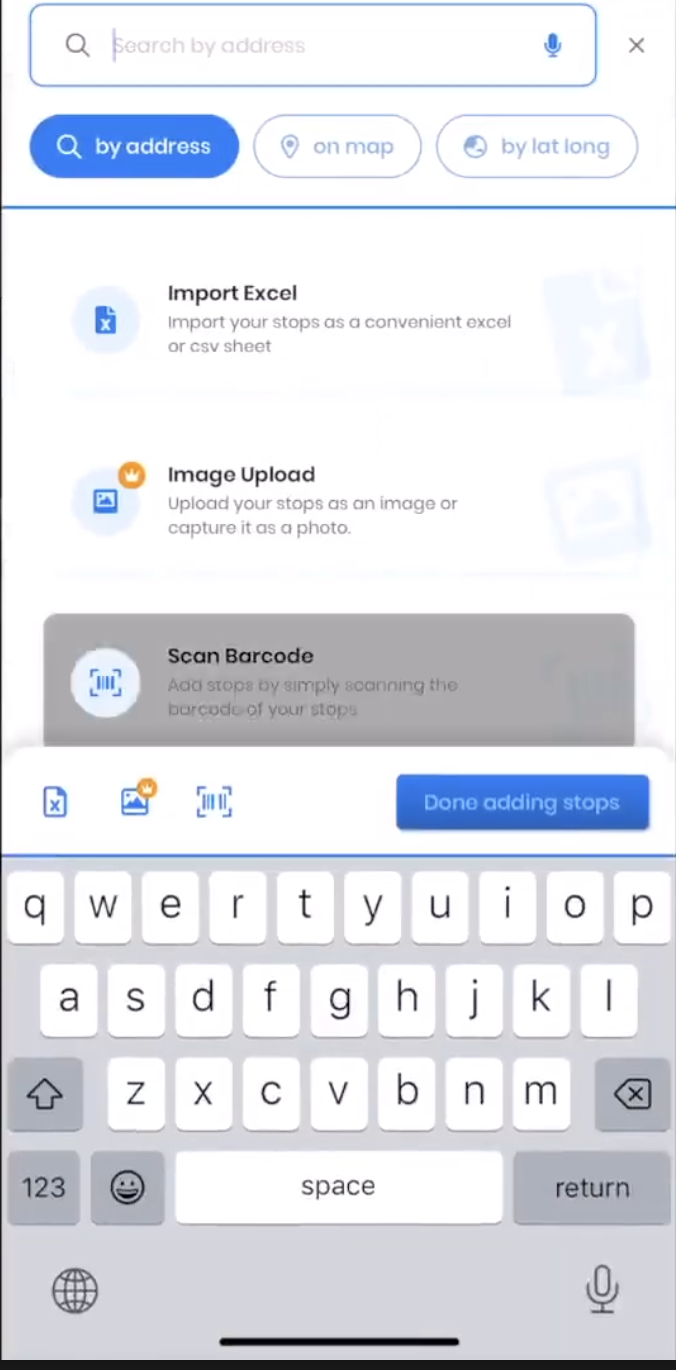
If you add your addresses manually, Zeo Route Planner uses the same auto-complete feature as Google Maps, which means you don’t have to type in the entire address to get the correct stop to pop up. Drivers can do this on the mobile app, which is great for when they need to add a last-minute stop to their route.
We have already mentioned that you can also import your addresses from a spreadsheet. This is the most efficient way of doing it, designed for delivery teams planning larger multi-stop routes. But apart from this, Zeo Route Planner also lets you capture image and import the addresses.
Now let’s discuss some crucial features of Zeo which a must to boost efficiency in your delivery process using a routing app.
#1. Route Optimization
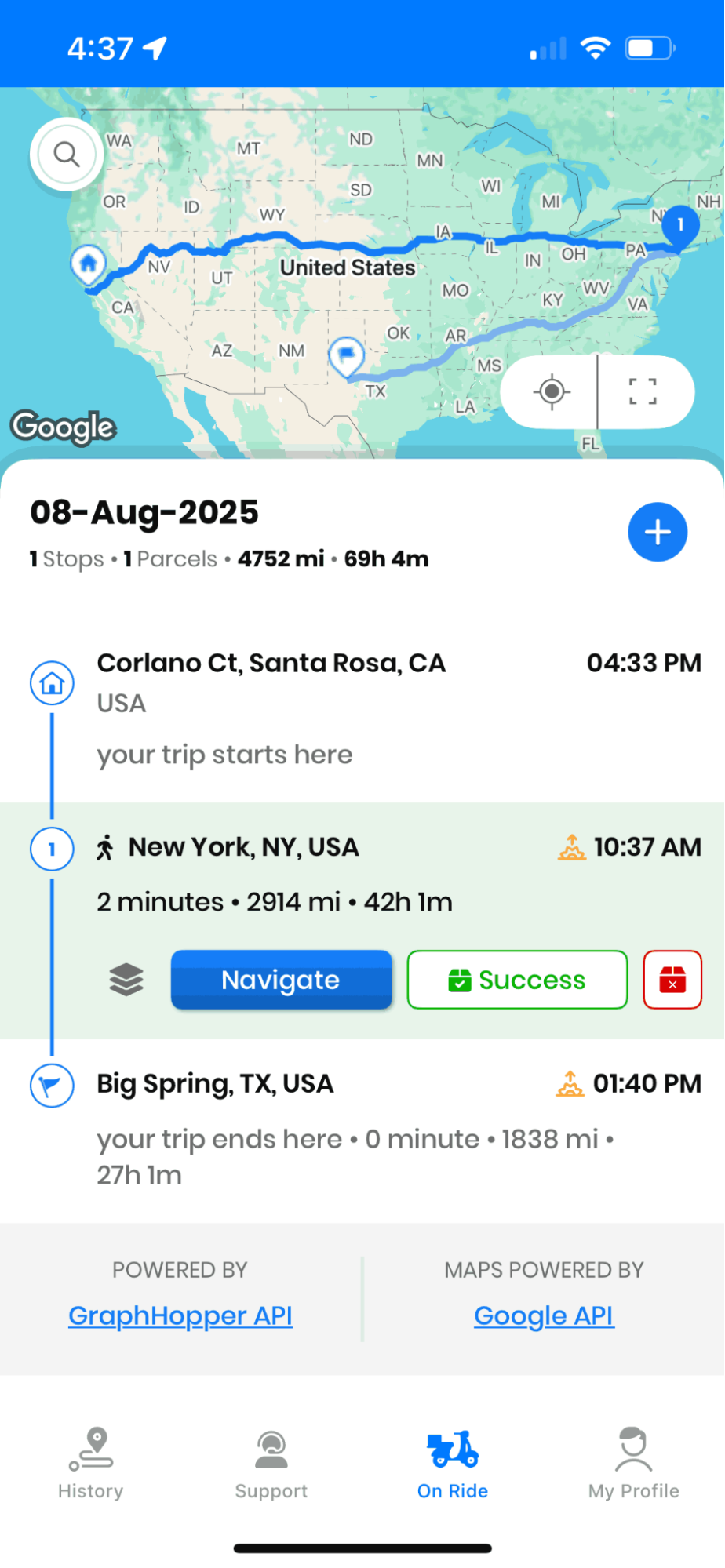
Once you are finished uploading the addresses, the Zeo Route Planner will take a minute to optimize the routes. Zeo Route Planner will provide you with the fastest route possible.
We have also included the feature “Navigate as entered” in the app.
This feature is included in case you want to proceed to the delivery without optimized routes. It sometimes happens that the drivers want to proceed to the addresses as they have got it by the dispatching office, and thus this Navigate as entered feature comes into play.
Most route planners don’t recognize that multiple deliveries at the same latitude and longitude should be treated as one location.
So we built the Multiple SKUs feature into Zeo Route Planner. It detects these same location stops with the same latitude and longitude, bundles them under one pin, and lets you still deliver and track each order separately.
Optimize routes with our algorithm, reducing travel time and costs efficiently.
increase fuel savings
Save 2 Hours on Deliveries, Everyday!

#2. Parcel Management
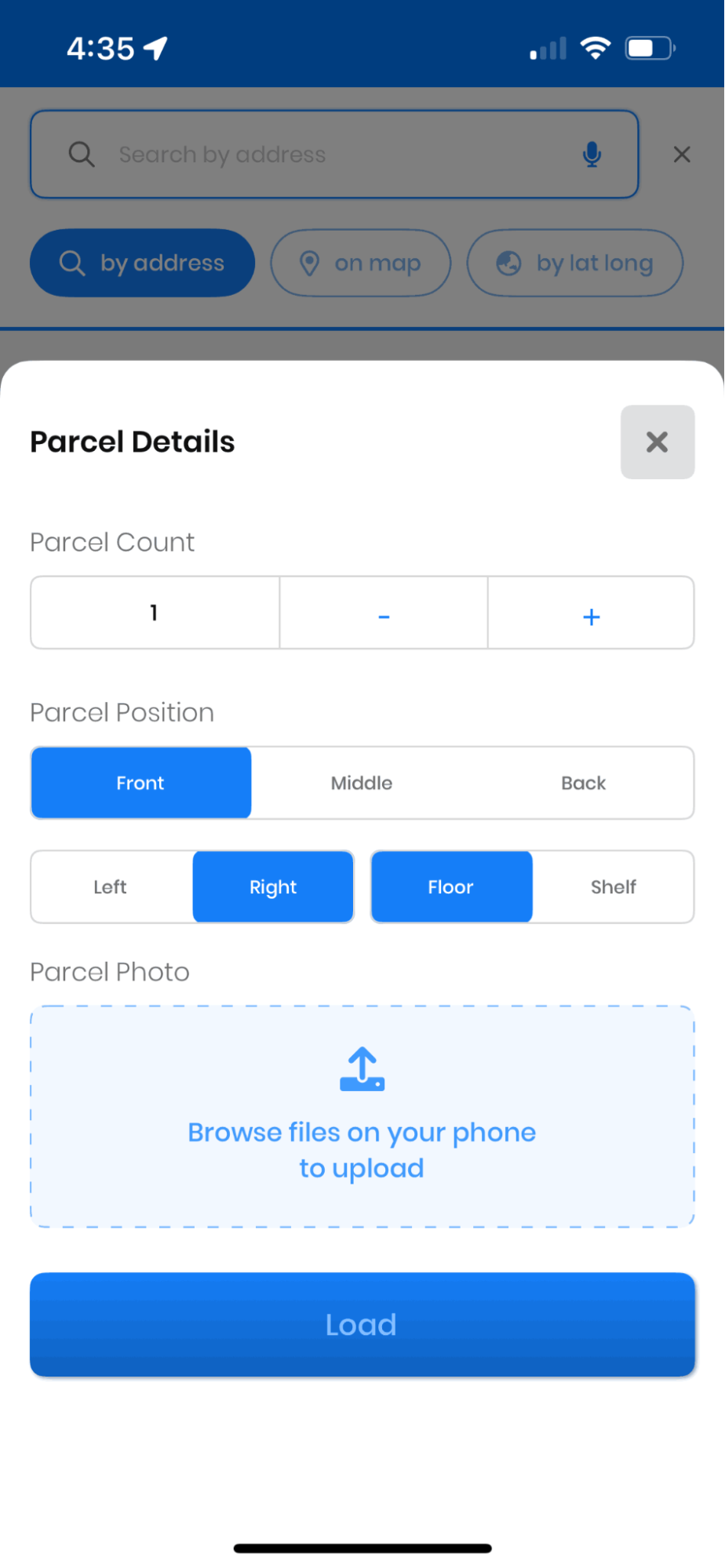
Zeo streamlines the process of adding, monitoring, and updating package details, including position, quantity, and images. This feature provides instant access to crucial information, enabling drivers to focus on precise, on-time deliveries. Fleet managers can make data-driven decisions by utilizing organized data.
Zeo’s mobile app helps fleet managers bring parcel management to their fingertips. It allows you to handle their deliveries efficiently. Zeo makes managing your delivery fleet simple and effective by tracking each and every parcel with details to update the information.
#3. Real-Time ETA Update
Using Zeo’s Real-Time ETA feature, the dispatchers can follow the route once it is in progress. For both the delivery team and customers, drivers can share their live location and enable real-time tracking. It ensures transparency and improved delivery estimates.
It also provides a real-time update on the location of your drivers within the context of their route. Instead of just reporting your driver’s cross streets or geographical location, Zeo Route Planner tells you where your driver is and what stop they’re going to next.
#4. Proof of Delivery
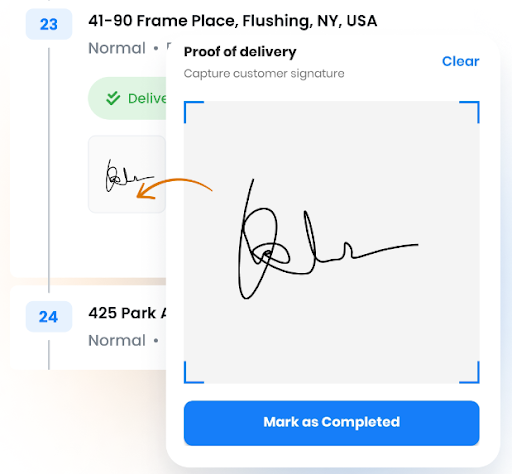
As we have mentioned that Zeo Route Planner provides the feature of POD. This is beneficial to all businesses as it helps you provide transparency in the delivery process with the customers. With Zeo Route Planner, you can send an SMS message or an email to your customers notifying them their package is on its way. As the driver gets closer to their stop, the customer gets an updated notification with a more specific time window.
We also offer two different types of proof of delivery functionality:
- Signature Capture
With signature capture, your delivery driver can use their smartphone to collect the customer’s signature. You don’t need a smartpen, and the customer can use their finger to sign.
- Photo Capture
If you need to leave a package, but the customer isn’t home, you can still collect proof of delivery by taking a photo. The driver snaps the photo with their smartphone, and the picture is then uploaded into Zeo Route Planner. Besides, a copy of this photo is sent to the customer and a notification that their package has been delivered.
Conclusion
The Zeo route planner app enhances delivery efficiency by creating the best route, allowing dispatch to know drivers’ locations for route adjustments, allowing for additional details and preferences, providing drivers with necessary information for quick stops, and providing customers with accurate updates of routes in progress and proof of delivery.
If you manage a team of drivers and want a simple, cost-effective way to manage plan deliveries, manage their routes, and track them in real-time, then go ahead and download the app and use it to raise your business and profits bar.
“`
Frequently Asked Questions
What is the difference between route planning and route optimization?
Route planning simply maps out the order of stops a driver needs to visit, while route optimization uses algorithms to calculate the most efficient sequence based on distance, time windows, and vehicle capacity. Optimization accounts for real-world variables like traffic patterns and delivery priorities that basic planning tools ignore. This distinction matters because optimized routes can significantly cut daily mileage and fuel consumption compared to manually planned ones.
How many stops can a driver realistically complete in an 8-hour shift?
The number varies widely based on delivery density, stop duration, and traffic, but urban routes with short service times often allow 80-120 stops, while rural or long-distance routes may only allow 15-25. Factors like parking availability, building access, and proof-of-delivery requirements also affect total capacity. Businesses typically benchmark this using historical route data rather than a fixed industry number.
Why do delivery routes become less efficient over time without optimization software?
As delivery volume grows, manually sequenced routes tend to accumulate backtracking, missed time windows, and uneven driver workloads that aren’t obvious until analyzed. Small inefficiencies compound daily, leading to overtime costs and late deliveries that erode customer trust. Route optimization tools like Zeo Route Planner solve this with AI-powered dynamic route adjustments, allowing dispatchers to save 2+ hours daily even as delivery volume scales.
What data do I need before importing addresses into a routing app?
At minimum, you need complete street addresses or GPS coordinates for each stop, but including time windows, priority levels, and package details improves optimization accuracy. Most businesses export this data from their order management system or a spreadsheet with columns for address, customer name, and delivery notes. Clean, standardized address formatting reduces geocoding errors and failed route calculations.
How does proof of delivery reduce disputes between customers and delivery companies?
Proof of delivery creates a timestamped, verifiable record showing exactly when and where a package was handed off or left, removing ambiguity when a customer claims non-receipt. Photo evidence and digital signatures are especially useful for high-value or signature-required shipments. Zeo Route Planner supports this with photo capture and digital signature collection, giving both drivers and dispatchers documented evidence for every delivery. The Federal Motor Carrier Safety Administration also recommends maintaining accurate delivery records as part of standard carrier documentation practices.

Are you a fleet owner?
Want to manage your drivers and deliveries easily?
Grow your business effortlessly with Zeo Routes Planner – optimize routes and manage multiple drivers with ease.

increase fuel savings
Save $200 on fuel, Monthly!
Optimize routes with our algorithm, reducing travel time and costs efficiently.
Get Started for Free



















