



Updated on: June 8, 2026
Starting a grocery delivery business means stepping into something already woven into daily life. Most households don’t overthink it, but they expect grocery deliveries to work quietly and consistently.
Orders arrive, meals get planned, and life moves on.
What keeps customers coming back is the seamless ordering, tracking, and receiving of the products in a timely fashion. So, for grocery delivery, if you get clear ordering, timely drop-offs, and zero friction, then it builds a habit for customers.
For small teams or solo founders, it’s a steady-entry market with reliable demand. The challenge is about how to start it right from setup to running consistently. Also, you’d need to identify cost centers and choose the right delivery partner who just gets the job done.
But, where to begin from? Let’s unpack.
How to Start a Grocery Delivery Business
A grocery delivery business requires a structure that holds up under daily use. Instead of chasing scale from day one, focus on building a small, repeatable system that delivers on time, every time.
Functioning of the grocery delivery business 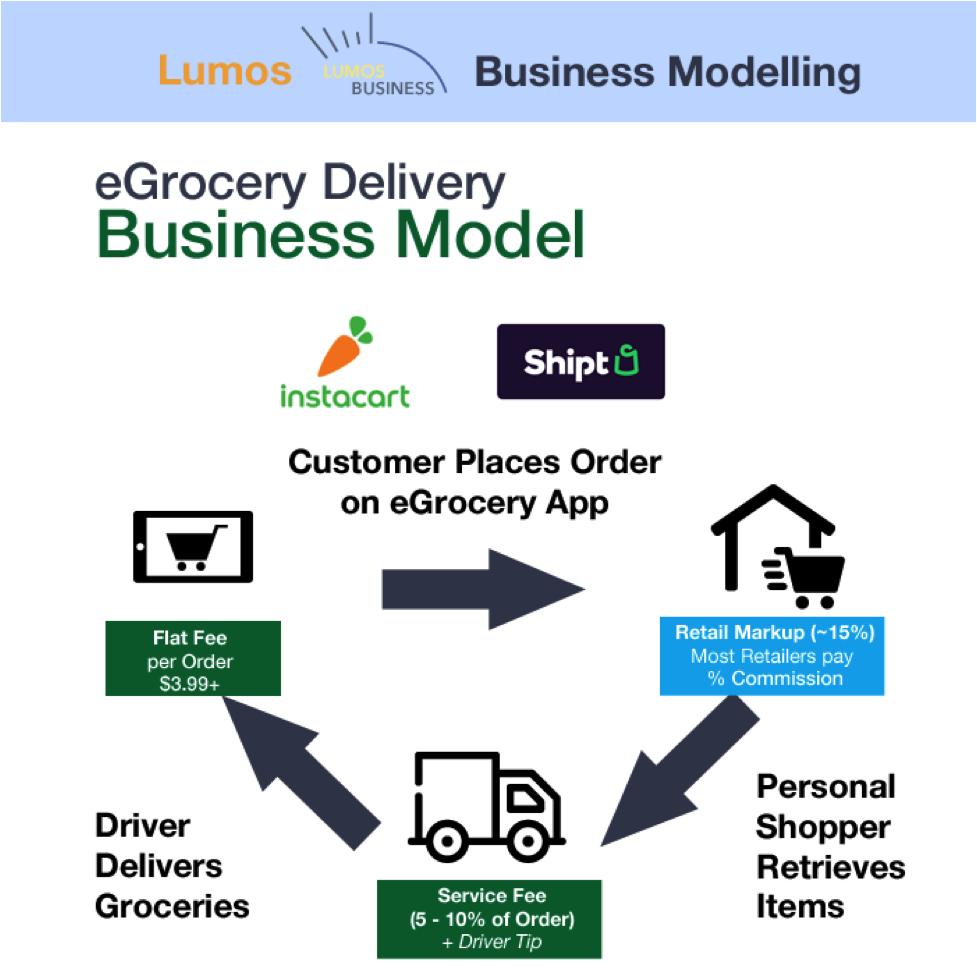
Below are the major stages that go into setting up a grocery delivery business.
1. Pick a Delivery Model You Can Run Daily
Set up a grocery delivery model that is deemed feasible. You have the following options:
Source [sample image for idea]
Functioning of the grocery delivery business 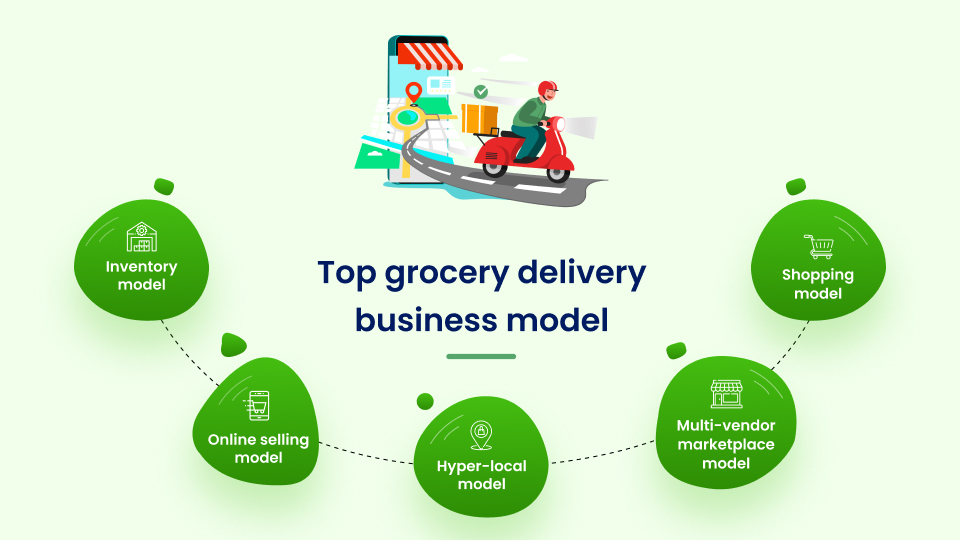
- Stock & Ship: Requires managing your own inventory, packing orders in-house, and sending them out. For example, Big Basket in India, Ocado in the UK, Farmstead in the US, etc.
- Store-Pickup: Orders to be collected from partner shops and delivered to customers. Instacart in the US, Jiomart in India, and even Blinkit’s initial model, which was launched in India.
- Marketplace: In this, multiple stores list their stock, and your platform manages logistics. For example, Amazon Fresh, Mercato (US), Licious (India), etc.
And so, start with the format that matches your pace and available resources.
2. Build Relationships with Suppliers
To demonstrate your business as a dependable grocery delivery business, you need to build supplier relationships that reduce clutter and give you consistent access to quality products.
Begin partnering with a mix of wholesalers, local markets, or trusted supermarkets: whichever suits your volume and customer preferences.
It’s one way to reduce last-minute shortages and lets you negotiate better deals as volume grows.
Typically, you’d:
- Approach multiple suppliers to compare pricing, availability, and delivery schedules.
- Set up a process for regular inventory updates from partners.
- Agree on backup suppliers for fast-moving essentials.
- Set up the tools for day-to-day operations that support orders, driver routes, and real-time visibility without adding unnecessary complexity.
The following actions can help here:
- A basic app or website for placing and tracking orders
- Route optimization functions that can handle multiple stops
- Providing alerts to customers + proof of delivery
- A dashboard for order flow and performance review
It’s here that you can use a platform like Zeo Route Planner. It helps grocery delivery businesses to reduce delays, avoid manual routing, and gain delivery insights with a range of features.
3. Use Tools That Don’t Get in Your Way
The supply chain, from storage to delivery and even confirmation, requires the use of tools. Using such platforms can provide the much-needed visibility to smooth operation from order to delivery.
These tools help to simplify delivery and routing operations. The focus remains on orders following a planned route, avoiding delays, and keeping customers in the know.
Optimize routes with our algorithm, reducing travel time and costs efficiently.
increase fuel savings
Hassle Free Deliveries & Pickups!

Essentials to have in place:
- A simple app or website for placing + tracking orders
- Route planning with stop optimization
- SMS/WhatsApp alerts for order confirmations and ETAs
- A live dashboard to track active orders and completed deliveries
This is where platforms like Zeo Route Planner shine.
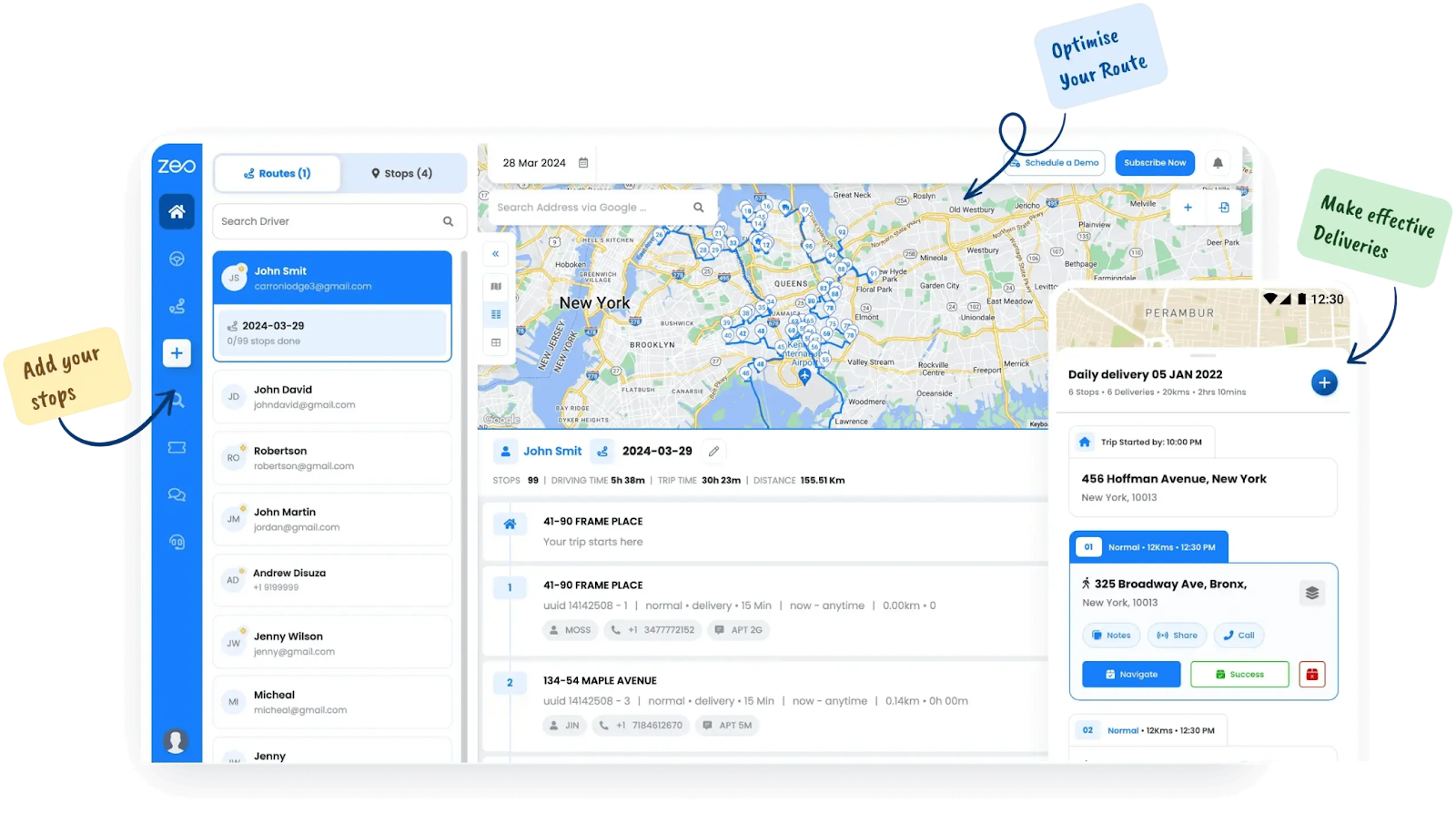
Zeo Route Planner
With features like automated route sequencing, scheduling, and proof-of-delivery tracking, your team can handle more stops with less stress, even during peak load.
4. Design Your Delivery and Fulfillment Loop
The heart of your grocery delivery business is effective delivery. This is the service that has no scope for compromises.
Therefore, the delivery model should work on optimized routes, consolidated orders, and communicate the timings to customers transparently.
The delivery and fulfilment will rest on:
- Mapping daily routes to minimize travel time (Google Maps batch routing works well).
- Establishing simple “order received/order out for delivery/order delivered” notifications.
- Having a checklist for order packing to prevent missing items.
5. Set Up Simple, Trusted Payment Systems
Cash dominates in many markets, but digital payments are fast catching up. Offer trusted choices, clearly outline payment steps, and maintain transparent reconciliation to build trust and avoid confusion.
That payment system should have the following:
- Options to accept cash and set up UPI or Paytm for digital convenience.
- Shared digital receipts or confirmations as soon as payments are received.
- Reconciled orders and payments daily to spot issues early.
Hire Delivery People
Establish standards and ensure that the hiring process for delivery aligns with them. The grocery is more about experience for the customers. So, it doesn’t matter to them who the person at the door is.
A -trained, familiar, and well-presented delivery staff consistently outperform larger fleets with uneven performance. Appearance and punctuality carry weight.
But so do micro-behaviors: confirming the right items, handing over the order with care, navigating apartment complexes without a dozen calls.
When hiring:
- Prioritize local familiarity and communication
- Offer training on handling goods and confirming deliveries
- Assign routes based on time windows and density
How Much Does It Cost to Start Your Delivery Service?
Starting a delivery or courier service typically costs anywhere from around $10,000 to over $250,000, depending on your service model and scale. Again, a lot of factors come into play when zeroing in on the cost aspect.
- Solo or small-scale local delivery (bike, scooter, single vehicle)
Estimated beginning: $10,000 to $20,000, ideal for very small operations without heavy infrastructure - Basic courier or package delivery (base vehicle purchase or lease)
Typical startup: $10,000 to $50,000, including vehicle, basic insurance, licenses, tech, and marketing. - Larger last-mile delivery operation (multi-vehicle, tech-focused)
More comprehensive launch budgets range from $49,000 up to $250,000, especially when including advanced infrastructure and a greater fleet size.
Conclusion
Starting a delivery service involves multiple steps, including planning your model, securing licenses, hiring delivery personnel, and budgeting for vehicles.
As far as the investment is concerned, the cost ranges from under $10K for solo operations to over $50K for small fleets. It may even go up to $250,000 if you’re planning for a tech-heavy last-mile delivery operation for grocery delivery.
Zeo Route Planner can help simplify your operations with real-time tracking, route optimization, and automated dispatching. It’s one, solid platform that allows you to start and even scale your grocery delivery business.

Are you a fleet owner?
Want to manage your drivers and deliveries easily?
Grow your business effortlessly with Zeo Routes Planner – optimize routes and manage multiple drivers with ease.
increase fuel savings
Hassle Free Deliveries & Pickups!
Optimize routes with our algorithm, reducing travel time and costs efficiently.
Get Started for Free



















